๐Ÿ  Home LexiLayers / News
News / September 2026

September 2026

โœจ Update

๐ŸŽ‰ What's New โ€” September 23, 2026

โœจ New Features


Party Mode

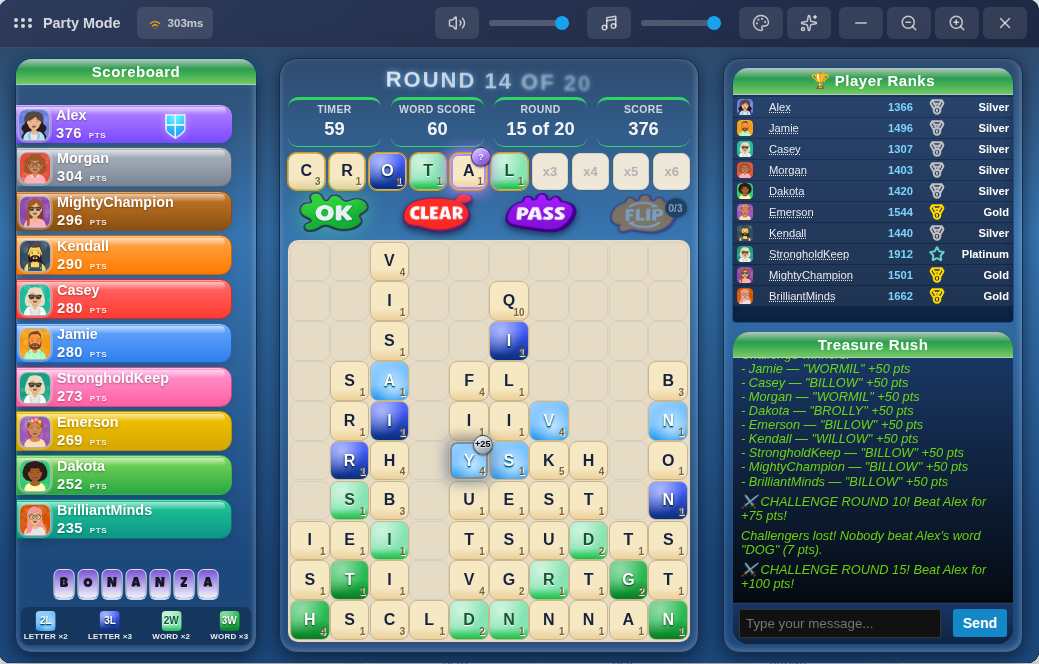
โ€ข Bonanza is now a Party Mode you can play with friends โ€” same board and pacing as Classic Party, with glowing bonus tiles scattered across the board to grab as you spell for extra points, joining Bronze/Silver/Gold/Mystery tiles already available in Single Player, Daily Challenge, and Face-Off.

โ€ข Waiting for a Party game to fill up no longer takes you away from Chat and the Leaderboard โ€” the waiting room now sits right in the lobby, so you can keep chatting ("need 3 more!") and see who's online the whole time you're waiting.

โ€ข The waiting room's player list now shows everyone's actual avatar and rank instead of just a name chip, and the Mode/Rounds/Round Time/Flips info takes up noticeably less space.

โ€ข It wasn't always obvious you could click a room in the list to peek at who's already inside โ€” there's now a small arrow that shows you can expand it.

โ€ข Added a "How to Play" button to the Party Mode lobby, and the room screen while playing now correctly shows "Party Mode" instead of the generic "Multiplayer" label.


Elimination

โ€ข Same as Party Mode above โ€” waiting for a game to fill up now happens right in the lobby, so Chat and the Leaderboard stay visible and usable instead of disappearing while you wait.

โ€ข Same waiting-room upgrade as Party Mode โ€” real avatars and rank badges for everyone waiting, and a more compact game-info layout.

โ€ข Fixed the 6-player, 8-player, and 10-player rooms sometimes showing the exact same name (like two different rooms both called "Last Stand Arena") โ€” each size now draws from its own set of names.

โ€ข Same expand-indicator fix as Party Mode above โ€” clearer that you can click a room to see who's in it.

โ€ข Added a "How to Play" button to the Elimination lobby.


Versus Mode

โ€ข Waiting for an opponent no longer takes you away from Chat and the Leaderboard โ€” same lobby upgrade as Party Mode and Elimination above.

โ€ข Added a "How to Play" button to the Versus Mode lobby.

โ€ข On some tablet-sized screens, the VS matchup card could show the two players stacked oddly instead of side by side. Fixed โ€” always side by side now, at any screen size.


๐Ÿ› Bug Fixes


General

โ€ข On tablet-sized screens, popups like the Coin Promo banner, the "What's New" announcement, and the "Your Words" review after a Single Player game could all show up slightly off-center. Fixed for every popup at once.

โ€ข On mobile, your coin balance could look cramped or even get cut off at the edge of the screen on the Daily Challenge, Party Mode, Elimination, and Versus Mode pages. Fixed โ€” it now sits on its own row below the title, same as Single Player already showed it.

โ€ข The lobby Leaderboard in Party Mode, Elimination, and Versus Mode could grow taller than the rest of the page once enough ranked players showed up. Capped to a clean top 10, matching the other lobby panels, with a small link underneath to jump straight to the full Community leaderboard if you want to see where you rank beyond the top 10.


Single Player

โ€ข On mobile, the Normal/Fast/Blitz leaderboards on the Ranked hub could cut a row off mid-way instead of showing it fully. Fixed โ€” leaderboards now show completely, no more mid-row cutoffs.


Single Player Bonanza

โ€ข Finishing a Bonanza run and hitting Play Again could leave you stuck on a black screen instead of starting a new game, with a full page refresh as the only way back in. Fixed.

โ€ข Bonanza game-overs weren't consistently showing your coin reward summary or refreshing your coin balance right away. Fixed.

โ€ข Your "Best word" on the results screen could occasionally show a word from a completely different game โ€” even a different mode โ€” instead of one you actually played that game. Fixed.

โ€ข The results screen now shows a Word score / Bonanza bonus breakdown so it's clear how your final score was built, instead of just the combined total.

โ€ข Clicking a player's name on a Bonanza leaderboard (Normal/Fast/Blitz) opened their overall profile stats instead of that preset's stats, so the numbers shown didn't match the leaderboard you were looking at. Fixed.

โ€ข Refreshing the page while on the Bonanza hub sent you back to the homepage instead of staying put, even though the URL still showed you were on the hub. Fixed.

โ€ข Made the results screen noticeably more compact overall โ€” less scrolling to see everything, on both phone and desktop.


Single Player Time Attack

โ€ข Same "Best word" fix as above applies here too โ€” a word from an earlier game could show up as this game's best even though you never played it. Fixed.

โ€ข Same refresh fix as Bonanza above โ€” refreshing on the Time Attack hub no longer bounces you back to the homepage.


Survival

โ€ข Clicking Wipe an extra time right after it had already cleared your last charge, or submitting a word that got rejected, could end your run outright and close the board with no explanation โ€” even though nothing was actually wrong. Fixed โ€” both now just get politely ignored so you can keep playing.


Single Player Survival

โ€ข Survival could be played as a guest without logging in, unlike every other ranked Single Player mode. Fixed โ€” now requires an account, same as the rest (Casual Classic is still open to everyone).


Daily Challenge Time Attack

โ€ข The leaderboard and your results history were showing a "time" next to your score that was really just the length of the match, so everyone who played it out looked like they'd taken the exact same few minutes. Since Time Attack has one shared countdown for everyone rather than a per-player finish time, that number wasn't telling you anything useful โ€” removed it from Time Attack's leaderboard and history rows; your score still shows as before.


Party Mode

โ€ข Coming back to the Party Mode hub using a "back" button (instead of the main menu) could sometimes leave the mode cards missing or out of date until you refreshed the page. Fixed.

โ€ข Submitting a word right as the round changed could leave your just-submitted tiles stuck visually sitting in your working row into the new round instead of clearing like normal. Fixed โ€” same fix applied to Elimination too.

โ€ข If a round ended early (everyone finished before the clock ran out) right before a Challenge round, you could keep hearing the old round's tick-tock sound playing all through the Challenge countdown. Fixed.

โ€ข The Game Over results screen is noticeably wider now on desktop, so standings have more room to breathe instead of feeling cramped โ€” and you can still chat with everyone the whole time results are showing. Each player's best word now shows right alongside their name in its own bigger tiles, instead of squeezed onto a second line underneath.

โ€ข The "Back to Lobby" button on the results screen looked grey and disabled-looking โ€” it's a proper button color now, with a bit more breathing room from the edges of the screen.

โ€ข If everyone left a game during the results screen, you could still hear a leftover countdown sound playing a little while later with nobody around to explain it. Fixed.


Elimination

โ€ข The results screen got a real upgrade: your name now shows in color (matching how Party Mode already worked), each player's best word shows in its own colored tiles, the game number is shown, and your final score now says "243 PTS" instead of just "243".

โ€ข On some screens the results screen could show a horizontal scrollbar and cut off a bit of your score on the right edge. Fixed โ€” everything fits cleanly now, on both phone and desktop.

โ€ข The coins-earned box looked oddly stretched out edge-to-edge on the results screen. It's a normal, centered size now.

โ€ข The "back to Multiplayer" button could take you to a broken page if you refreshed right after using it. Fixed.


Face-Off

โ€ข Made the "Start Game?" confirmation screen more compact for every Face-Off variant โ€” on smaller screens it used to need scrolling just to reach the Start Game button, it shouldn't anymore.

โ€ข On a shaky connection, tiles could stop responding to taps mid-round even though the timer kept counting down normally. Fixed โ€” a brief connection blip should no longer leave the board stuck.


Homepage

โ€ข The homepage announcement badge could show a working link on hover but do nothing when clicked, if that link pointed at a page like Help Center instead of somewhere inside the app itself. Fixed.

โ€ข A badge link pointing at a specific Help Center article (like "How to Play") would open the right page from outside the app, but do nothing if you were already inside it. It now takes you straight there either way.


Help Center

โ€ข Clicking around between articles inside the Help Center used to leave the page address pointing at whichever article you first arrived on. Every article now gets its own link as you browse, so you can copy the address bar and share the exact page you're looking at, and the browser's back/forward buttons now step through the articles you've viewed.
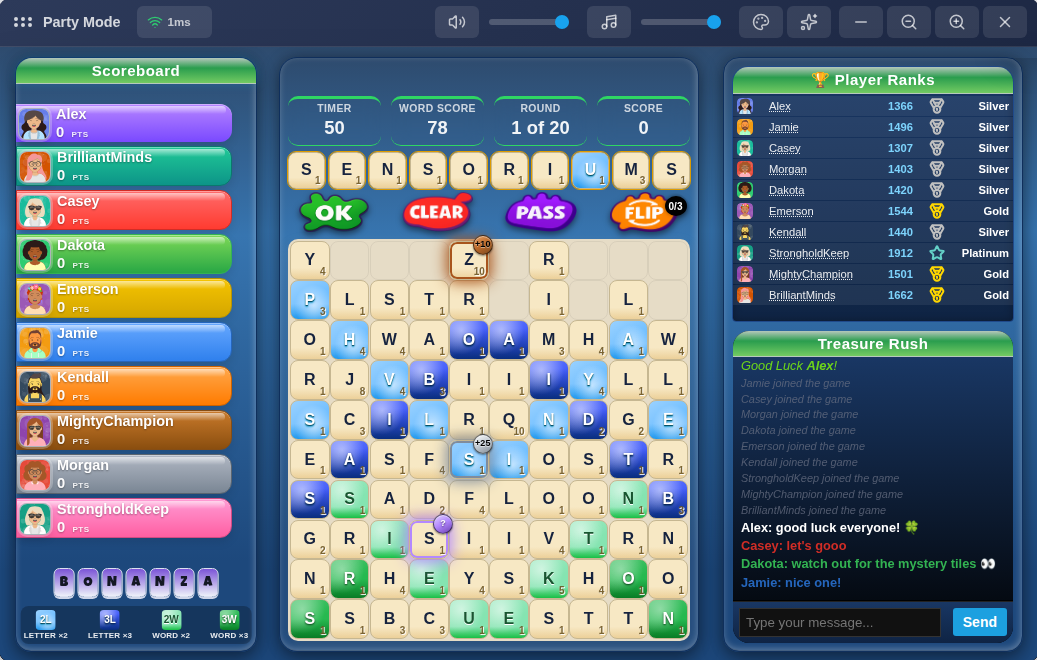
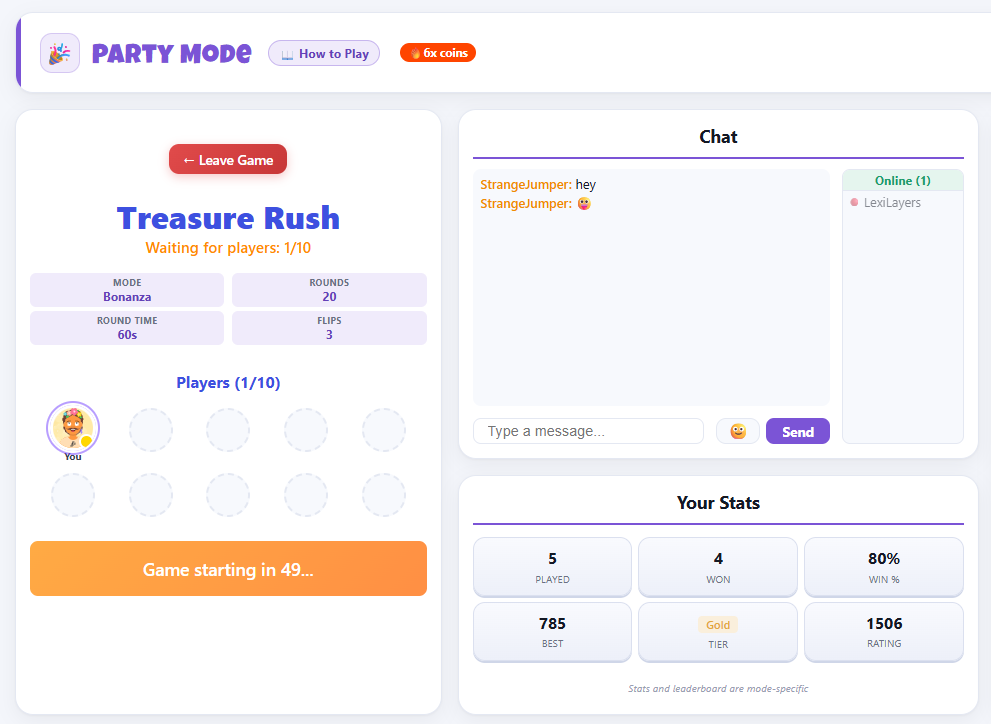
Image 1 for ๐ŸŽ‰ What's New โ€” September 23, 2026Image 2 for ๐ŸŽ‰ What's New โ€” September 23, 2026Image 3 for ๐ŸŽ‰ What's New โ€” September 23, 2026
โœจ Update

๐ŸŽ‰ What's New โ€” September 18, 2026

โœจ New Features


Shop

โ€ข When items are on sale, you'll now see an "Items on Sale" ribbon in the top corner of the homepage plus a matching card further down, both linking straight to the Shop and jumping right to the sale items instead of the full catalog, so you don't have to stumble onto a sale by chance or hunt for the sale filter yourself.


๐Ÿ› Bug Fixes


Single Player

โ€ข On mobile, the Normal/Fast/Blitz leaderboards on the Ranked hub could cut a row off mid-way instead of showing it fully. Fixed โ€” leaderboards now show completely, no more mid-row cutoffs.


Single Player Bonanza

โ€ข Finishing a Bonanza run and hitting Play Again could leave you stuck on a black screen instead of starting a new game, with a full page refresh as the only way back in. Fixed.

โ€ข Bonanza game-overs weren't consistently showing your coin reward summary or refreshing your coin balance right away. Fixed.

โ€ข Your "Best word" on the results screen could occasionally show a word from a completely different game โ€” even a different mode โ€” instead of one you actually played that game. Fixed.

โ€ข The results screen now shows a Word score / Bonanza bonus breakdown so it's clear how your final score was built, instead of just the combined total.

โ€ข Clicking a player's name on a Bonanza leaderboard (Normal/Fast/Blitz) opened their overall profile stats instead of that preset's stats, so the numbers shown didn't match the leaderboard you were looking at. Fixed.

โ€ข Refreshing the page while on the Bonanza hub sent you back to the homepage instead of staying put, even though the URL still showed you were on the hub. Fixed.

โ€ข Made the results screen noticeably more compact overall โ€” less scrolling to see everything, on both phone and desktop.


Single Player Time Attack

โ€ข Same "Best word" fix as above applies here too โ€” a word from an earlier game could show up as this game's best even though you never played it. Fixed.

โ€ข Same refresh fix as Bonanza above โ€” refreshing on the Time Attack hub no longer bounces you back to the homepage.


Face-Off

โ€ข Made the "Start Game?" confirmation screen more compact for every Face-Off variant โ€” on smaller screens it used to need scrolling just to reach the Start Game button, it shouldn't anymore.


โ€” LexiLayers Team

โœจ Update

๐ŸŽ‰ What's New โ€” September 12, 2026

๐Ÿ› Bug Fixes


Party

โ€ข Playing a Bonanza game and then jumping straight into a Party match could carry Bonanza's bonus tiles over onto a board that isn't supposed to have any. Fixed โ€” Party now always starts clean regardless of what you played right before. While fixing it we double-checked Versus, Elimination, and Survival for the same issue and hardened them too, though we didn't find it actually happening there.


Daily Challenge

โ€ข The "Play today" button on the landing page sent you straight to a sign-up prompt if you weren't logged in, even just to look at today's challenge. Now you can open the Daily Challenge hub as a guest and browse today's challenge and the leaderboard freely โ€” you'll only be asked to create an account when you actually try to play.

โ€ข On a slow connection, clicking Start could sometimes register twice and quietly reset your game's timer partway through. The Start button now only responds to the first click.


Single Player Survival

โ€ข Fast now runs 9 minutes instead of 10. Also corrected outdated feed-speed numbers in the Help Center's preset table.

โ€ข The board used to hit its fastest feed speed way earlier than it needed to, leaving a long stretch at the end where nothing changed. Retuned the ramp so all three presets โ€” Normal, Fast, and Blitz โ€” now reach max speed with about a minute and a half of play still ahead, for a more consistent finish across the board.


Menu

โ€ข The user menu could require scrolling to reach "Report a Bug" at the bottom of the list. Fixed โ€” the menu now gives itself enough room to show everything without scrolling on typical screens.


Landing Page

โ€ข The "Single Player" activity badge only ever counted Classic games, so it could show far fewer players online than were actually active in Bonanza, Survival, or Time Attack. It now reflects all of them.


App Icon

โ€ข Installing LexiLayers as an app showed a cramped, hard-to-read icon in the Windows taskbar and Start menu. It's now a clean, bold "L" tile that stays legible at small sizes.

โ€ข On some Android phones that same icon could look oddly cropped, with barely any of its green background showing. Fixed so it displays with its full color intact. (If you already installed the app, you'll need to remove and reinstall it from your home screen to pick up the new icon.)


โ€” LexiLayers Team

โœจ Update

๐ŸŽ‰ What's New โ€” September 9, 2026 (High Priority)

๐Ÿ› Bug Fixes


Face-Off

โ€ข The round timer could keep counting down in the background even after a game ended and the results screen was already up. It now stops the instant the game is over.


Time Attack

โ€ข The "N open" badge on Face-Off Time Attack's entry-fee options wasn't updating when you switched between Short/Normal/Long โ€” it now correctly shows open games for whichever time length you actually have selected.

โ€ข Starting a Time Attack game showed your Time/Players/Fee picks again as a fully editable picker on the confirmation screen, right after you'd already chosen them. It's now a locked summary of what you picked, same as joining an open game already worked โ€” close the confirmation and adjust on the previous screen if you want to change anything.


Face-Off Survival

โ€ข The "N open" badge on the entry-fee options wasn't updating when you switched between Normal/Fast/Blitz โ€” it now correctly shows open games for whichever preset you actually have selected.

โ€ข Starting a Survival game showed your Normal/Fast/Blitz pick again as a fully editable picker on the confirmation screen, right after you'd already chosen it. It's now a locked summary of what you picked โ€” quick-joining an open game from the landing page still lets you choose, since nothing's been picked yet at that point.


Single Player Bonanza & Time Attack

โ€ข Playing several games in a row without leaving the mode could produce a wildly inflated score and coin payout on later games, unrelated to how you actually played. Fixed โ€” every game now starts completely clean.

โ€ข As a result, a handful of leaderboard scores that came from this weren't real and have been corrected back to what was actually earned.


โ€” LexiLayers Team

โœจ Update

๐ŸŽ‰ What's New โ€” September 6, 2026

โœจ New Features


Time Attack, now everywhere

โ€ข Time Attack โ€” race a countdown clock instead of a fixed number of rounds โ€” was previously only in Face-Off. It's now also available in Single Player, and shows up from time to time as the Daily Challenge's format.

โ€ข 7 new badges to earn for playing Time Attack, wherever you play it โ€” Daily, Single Player, or Face-Off all count toward the same progress.


New Face-Off Survival badges (Once Survival is enabled for Face-Off)

โ€ข 7 new badges for Face-Off Survival โ€” entry fees, win streaks, and games-played milestones, matching what our other Face-Off modes already have.


Bonanza comes to Single Player

โ€ข Bonanza โ€” grab glowing Bronze, Silver, Gold, and Mystery bonus tiles as you spell โ€” is now available in Single Player, alongside its existing spots in Daily Challenge and Face-Off.

โ€ข Pick your pace: Normal, Fast, or Blitz.


New background music

โ€ข A few new background tracks have joined the rotation while you play.


How to Play, right where you need it

โ€ข Every Single Player mode (Classic, Survival, Time Attack, and Bonanza) now has a "How to Play" button right in its header, same as Face-Off already has โ€” no more guessing the rules.


Three new Leximon body shapes

โ€ข Bubble, Loaf, and Heart join Square, Bean, and Ghost as free body shapes for your Leximon โ€” mix and match with any color, accessory, or hat you've already unlocked.


Survival's endgame hits harder

โ€ข Single Player Survival's Normal, Fast, and Blitz all ramp up to top speed sooner now, so you spend more of each run in the danger zone instead of coasting through a long, gentle buildup.


๐Ÿ› Bug Fixes


Avatar

โ€ข The Graphic and Lexi shirts printed their design in white, which disappeared against a white shirt. The print now switches to a dark color automatically on white and near-white shirts so it's always visible.


Messages

โ€ข The "selected" counter when picking multiple messages to archive or delete wasn't updating as you selected them. Fixed.


Single Player

โ€ข Classic games were missing the tile-spelled "CLASSIC" name in the left panel that our other Single Player modes show. Fixed.


Live Activity

โ€ข The public feed's "set a new high score" line could read like an all-time record instead of your own personal best โ€” reworded for clarity.


Single Player

โ€ข The Casual and Ranked hub pages showed two Back buttons stacked on top of each other. Fixed.


My Stats & Leaderboards

โ€ข Single Player, Party, Versus, and Elimination games in My Stats, player profiles, and the community leaderboards now consistently show simple names (like "Normal" or "Fast") instead of technical round/timer details.


โ€” LexiLayers Team

Image 1 for ๐ŸŽ‰ What's New โ€” September 6, 2026Image 2 for ๐ŸŽ‰ What's New โ€” September 6, 2026