🏠 Home LexiLayers / News

LexiLayers News

What's new, what's changed, and what's coming up.

✨ Update

🎉 What's New — October 14, 2026

🐛 Bug Fixes


Face-Off

• Reconnecting mid-game during a Face-Off Survival match could end the match early and count it as a quit, even if you were still actively playing right up to the moment you reconnected. Fixed — reconnecting now properly resumes your game instead.

• In Survival, a connection hiccup during the game could end it with no final results panel shown — you'd see "Starting..." stuck on the hub's challenge button instead, even though the game had actually finished. Fixed — results now show correctly and the hub no longer gets stuck.

• Joining a Face-Off Survival game from the landing page's "open games" button could silently create a brand-new Normal game instead of actually joining the Fast or Blitz one you clicked on, leaving you waiting alone for a second player who'd never show. Fixed — you're now matched into the real open game, at the speed it's actually running.

• Accepting a friends-only private Face-Off Survival invite could silently drop you into an ordinary Classic match instead — a full board, normal rounds, none of Survival's rising feed or bonus tiles — and quitting took you to the wrong hub afterward. Fixed — accepting a Survival invite now starts an actual Survival game.


Survival

• In rare cases, the Game Over screen's "Final score" could show a tiny number — just your very last word's points — instead of your real total, in Single Player, Daily, or Face-Off Survival. Your actual score and rewards were always correct and unaffected; this was a display-only bug. Fixed.


Time Attack

• The SCORE display could get replaced by your latest word's points instead of adding to your running total, making it look much lower than it really was mid-game. Fixed — your real total was always being saved correctly; this was a display-only bug.

• Playing Face-Off Time Attack right after a Single Player Time Attack game could skip the "are you sure?" quit confirmation entirely, and leave the "Create Challenge" button stuck on "Starting..." until you refreshed. Fixed.

• On a shaky (but not fully dropped) connection, Face-Off Time Attack's tiles could stop responding for long stretches mid-game. Fixed — reconnecting now always refreshes the board and gets your tiles responding again.


Friends & Invites

• Toast pop-ups like "X declined your invite" or "X accepted your invite" across Party Mode and Versus used to flash by too fast to read. Fixed — they now stay up long enough to actually read.

• A private Face-Off invite message never said which mode it was for (Classic, Bonanza, Survival, or Time Attack) — now it does, and includes a link straight to the right place to accept it.

• Accepting a private Face-Off Bonanza or Survival invite used to show just a bare "60s • 4 flips" badge, nothing about Bonanza's bonus tiles or Survival's Wipe/Extra Flip/Wildcard mechanics. Now it shows the same full breakdown you already see when starting a public match.

• A friends-only Face-Off invite's confirmation screen could show the wrong player count and an inflated prize estimate (it was reading an unrelated admin setting instead of how many friends you actually invited). Fixed — it now always shows the real group size and the prize you'll actually be playing for.

• Accepting a private Time Attack invite used to show a bare fee amount with no idea what you'd actually win. Now it shows the same real prize breakdown you already see when starting a public match, and a friends-only invite's player count is no longer sometimes wrong.

• The "Select Friends to Challenge" list when creating a private Face-Off or Time Attack game showed every friend as a plain letter circle, even friends with a custom avatar set. Fixed — your friends' real avatars now show up there too.

• The note on a friends-only invite said the game only completes once everyone you invited has played — it can also complete once the time limit runs out, even if not everyone joined. The join screen now says so, and makes clear the shown prize assumes full turnout.

• Creating a private Face-Off or Time Attack game never showed what you were actually about to play — rounds, round length, Bonanza's tile values, Survival's bonus-tile mechanics, none of it, even though accepting an invite already showed all of it. Now the create screen shows the same information before you commit your coins. A shareable invite's "N Player Mode" badge also used to read like a guaranteed headcount; it now says "Up to N Players," since that's the real ceiling, not a promise.

• Creating a private Face-Off or Time Attack game now opens your friends list in its own quick picker instead of a long list taking up space in the middle of the screen — pick who to challenge, and it just shows how many you picked. Survival's bonus-tile details also moved behind a tap-to-view button so the create screen stays short and the difficulty picker is right up top where you can see its effect immediately.
✨ Update

🎉 What's New — October 7, 2026

✨ New Features


Versus

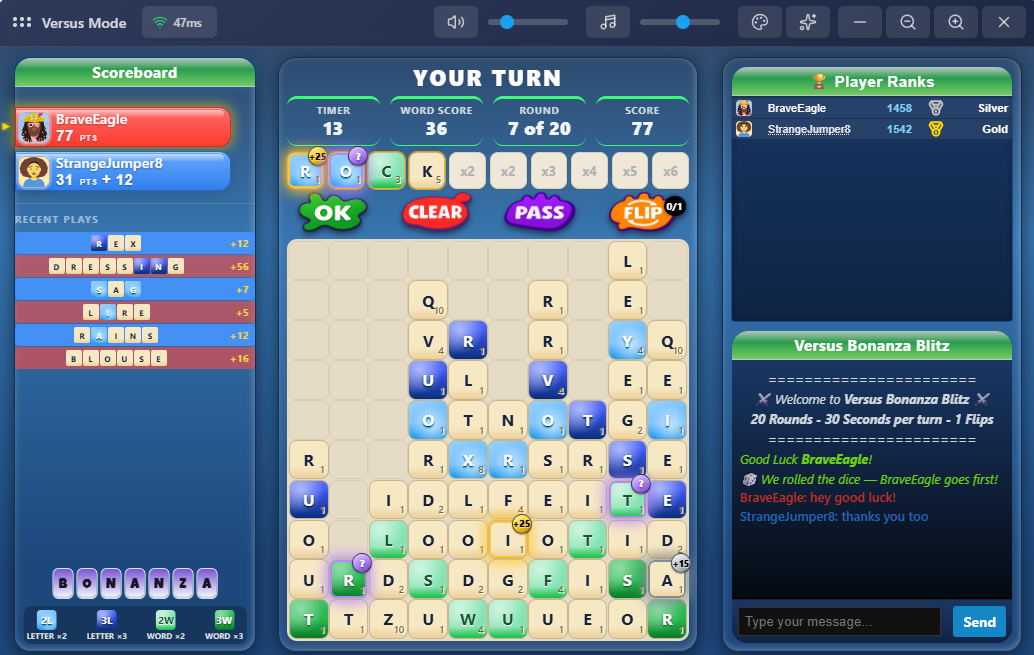
• Added Bonanza to Versus Mode — same head-to-head, shared-board rules you already know, now with glowing bonus tiles scattered across the board. Grab a Gold, Silver, or Bronze tile in a word for extra points, or risk a Mystery tile for a surprise swing either way. You can also now toggle Normal, Fast, Blitz, and Bonanza on or off independently.

• Normal, Fast, and Blitz now live together under one "Versus Classic" card instead of three separate lobbies — pick your speed right inside the lobby, same as Single Player's Classic mode. Your leaderboard standings and stats for each speed are exactly where you left them, just a tap away instead of a separate page.

• Your Versus stats on the My Stats page now clearly separate Classic (red) from Bonanza (purple) for Normal, Fast, and Blitz, instead of lumping all six into one unlabeled color.


🐛 Bug Fixes


Daily Challenge

• On a shaky connection, tiles could stop responding to taps mid-round (including during Time Attack) even though the timer kept counting down normally. Fixed — a brief connection blip should no longer leave the board stuck.

• If you got a word in right at the very last second before the timer ran out, the round immediately after could sometimes get skipped entirely — ending before you ever got a chance to play it. Fixed — a last-second submission no longer costs you the next round.

• In Time Attack, fully reconnecting after a dropped connection could leave the board looking normal but completely unresponsive to taps — flipping was the only thing that would bring it back. Fixed — the board now wakes back up correctly on its own once you're reconnected.

• If a word you submitted got lost to a connection hiccup right as its round ended, its points could stay stuck in your running score even though the word itself correctly didn't count. Fixed — your score now stays accurate even when a submission doesn't make it through.


Single Player

• Same connection-blip fix as Daily Challenge above — tiles could stop responding to taps after a brief network hiccup, even with the timer still running normally.

• Same last-second-submission fix as above — a word squeezed in right at the buzzer could sometimes skip the entire next round.

• Same interrupted-game fix as Daily Challenge above — Ranked, Time Attack, Survival, or Bonanza, an interrupted game now ends cleanly and keeps whatever score you'd actually earned, instead of disappearing.

• Same Time Attack reconnect-freeze fix as Daily Challenge above.


Face-Off

• Same last-second-submission fix as above — a word squeezed in right at the buzzer could sometimes skip the entire next round.

• Same interrupted-game fix as Daily Challenge and Single Player above — Classic, Bonanza, Time Attack, or Survival, an interrupted game now ends cleanly and keeps whatever score you'd actually earned, instead of disappearing.


Survival

• The main timer could pulse red like it was almost out of time right from the start of a Survival run if you'd just finished a close call in another mode. Fixed — it now always reflects your actual time left.


Party Mode

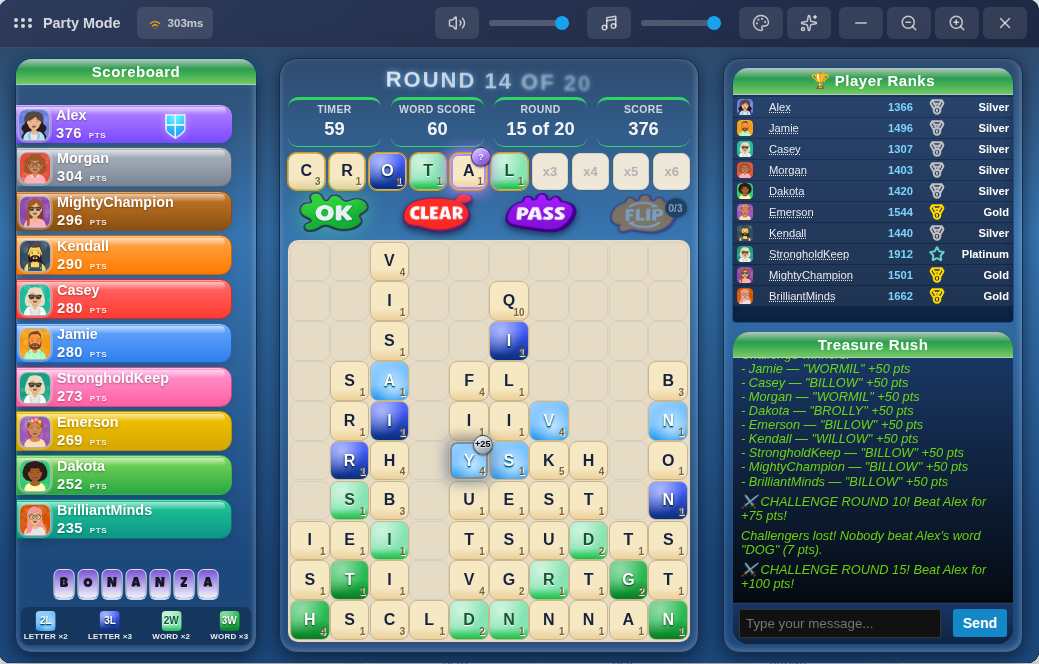
• In Bonanza Party games, bonus tiles were staying put on screen instead of moving up with the board like they do everywhere else. Fixed — they now rise with the board correctly on every mode.

• Leaving the game during a Challenge round could leave its music playing with nothing on screen. Fixed — leaving now stops the music every time.

• After the occasional mid-game ad break, regular music could keep playing over the Challenge round countdown that follows instead of staying quiet until the Challenge music kicks in. Fixed.


Landing Page

• The Live Activity feed could show a player as "Usernull" instead of a proper name for guest play. Fixed — shows "Guest" now.

• Signing up with Google or Microsoft never showed the usual "👋 [name] joined!" post in the Live Activity feed, even though the account itself was created just fine. Fixed — every new signup shows up now, however you sign up.

• The Word Spotlight card could occasionally show something like "plural of flirt" instead of an actual definition when the word of the moment was a plural or other word form. Fixed — the card now always shows a real definition.


Versus

• Leaving right after a match ended (during the "next game starts in..." countdown) incorrectly warned that you'd forfeit and lose the match. Fixed — that warning now only shows while a match is actually still being played.

• The countdown tick sound during the last 10 seconds of a round never played in Versus, and could even start ticking again after a match ended while you were looking at the results screen. Fixed on both counts.

Image 1 for 🎉 What's New — October 7, 2026
✨ Update

🎉 What's New — September 23, 2026

✨ New Features


Party Mode

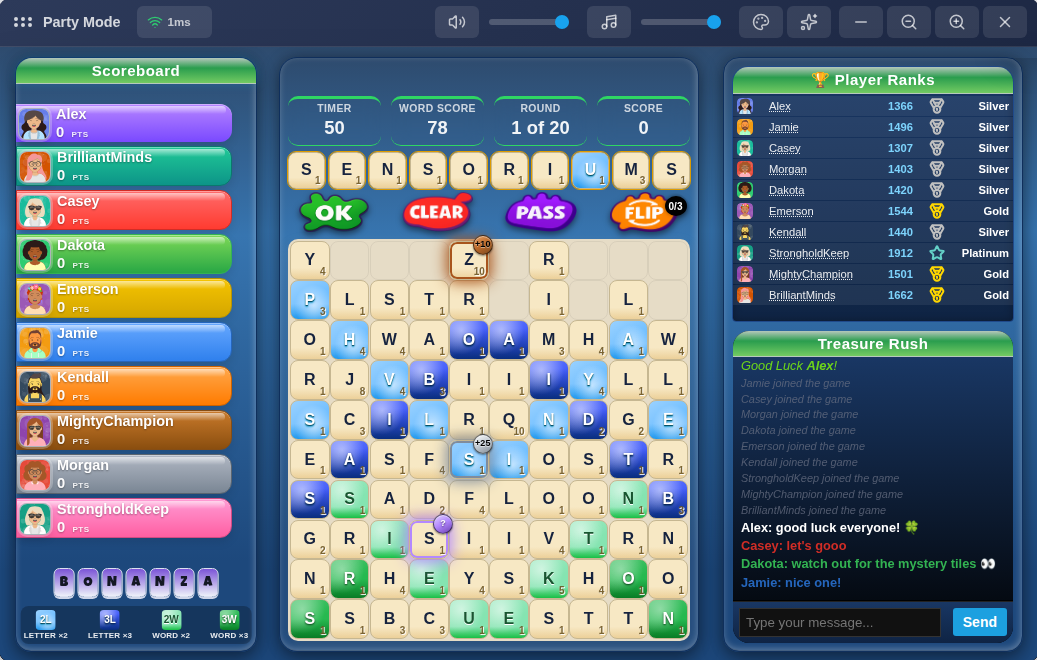
• Bonanza is now a Party Mode you can play with friends — same board and pacing as Classic Party, with glowing bonus tiles scattered across the board to grab as you spell for extra points, joining Bronze/Silver/Gold/Mystery tiles already available in Single Player, Daily Challenge, and Face-Off.

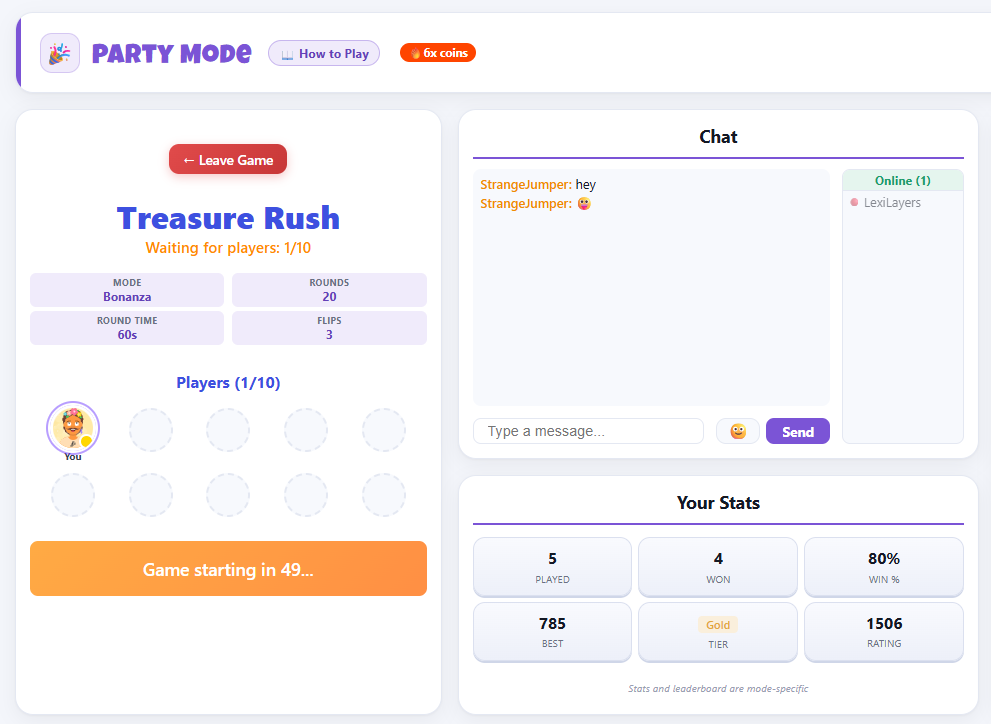
• Waiting for a Party game to fill up no longer takes you away from Chat and the Leaderboard — the waiting room now sits right in the lobby, so you can keep chatting ("need 3 more!") and see who's online the whole time you're waiting.

• The waiting room's player list now shows everyone's actual avatar and rank instead of just a name chip, and the Mode/Rounds/Round Time/Flips info takes up noticeably less space.

• It wasn't always obvious you could click a room in the list to peek at who's already inside — there's now a small arrow that shows you can expand it.

• Added a "How to Play" button to the Party Mode lobby, and the room screen while playing now correctly shows "Party Mode" instead of the generic "Multiplayer" label.


Elimination

• Same as Party Mode above — waiting for a game to fill up now happens right in the lobby, so Chat and the Leaderboard stay visible and usable instead of disappearing while you wait.

• Same waiting-room upgrade as Party Mode — real avatars and rank badges for everyone waiting, and a more compact game-info layout.

• Fixed the 6-player, 8-player, and 10-player rooms sometimes showing the exact same name (like two different rooms both called "Last Stand Arena") — each size now draws from its own set of names.

• Same expand-indicator fix as Party Mode above — clearer that you can click a room to see who's in it.

• Added a "How to Play" button to the Elimination lobby.


Versus Mode

• Waiting for an opponent no longer takes you away from Chat and the Leaderboard — same lobby upgrade as Party Mode and Elimination above.

• Added a "How to Play" button to the Versus Mode lobby.

• On some tablet-sized screens, the VS matchup card could show the two players stacked oddly instead of side by side. Fixed — always side by side now, at any screen size.


🐛 Bug Fixes


General

• On tablet-sized screens, popups like the Coin Promo banner, the "What's New" announcement, and the "Your Words" review after a Single Player game could all show up slightly off-center. Fixed for every popup at once.

• On mobile, your coin balance could look cramped or even get cut off at the edge of the screen on the Daily Challenge, Party Mode, Elimination, and Versus Mode pages. Fixed — it now sits on its own row below the title, same as Single Player already showed it.

• The lobby Leaderboard in Party Mode, Elimination, and Versus Mode could grow taller than the rest of the page once enough ranked players showed up. Capped to a clean top 10, matching the other lobby panels, with a small link underneath to jump straight to the full Community leaderboard if you want to see where you rank beyond the top 10.


Single Player

• On mobile, the Normal/Fast/Blitz leaderboards on the Ranked hub could cut a row off mid-way instead of showing it fully. Fixed — leaderboards now show completely, no more mid-row cutoffs.


Single Player Bonanza

• Finishing a Bonanza run and hitting Play Again could leave you stuck on a black screen instead of starting a new game, with a full page refresh as the only way back in. Fixed.

• Bonanza game-overs weren't consistently showing your coin reward summary or refreshing your coin balance right away. Fixed.

• Your "Best word" on the results screen could occasionally show a word from a completely different game — even a different mode — instead of one you actually played that game. Fixed.

• The results screen now shows a Word score / Bonanza bonus breakdown so it's clear how your final score was built, instead of just the combined total.

• Clicking a player's name on a Bonanza leaderboard (Normal/Fast/Blitz) opened their overall profile stats instead of that preset's stats, so the numbers shown didn't match the leaderboard you were looking at. Fixed.

• Refreshing the page while on the Bonanza hub sent you back to the homepage instead of staying put, even though the URL still showed you were on the hub. Fixed.

• Made the results screen noticeably more compact overall — less scrolling to see everything, on both phone and desktop.


Single Player Time Attack

• Same "Best word" fix as above applies here too — a word from an earlier game could show up as this game's best even though you never played it. Fixed.

• Same refresh fix as Bonanza above — refreshing on the Time Attack hub no longer bounces you back to the homepage.


Survival

• Clicking Wipe an extra time right after it had already cleared your last charge, or submitting a word that got rejected, could end your run outright and close the board with no explanation — even though nothing was actually wrong. Fixed — both now just get politely ignored so you can keep playing.


Single Player Survival

• Survival could be played as a guest without logging in, unlike every other ranked Single Player mode. Fixed — now requires an account, same as the rest (Casual Classic is still open to everyone).


Daily Challenge Time Attack

• The leaderboard and your results history were showing a "time" next to your score that was really just the length of the match, so everyone who played it out looked like they'd taken the exact same few minutes. Since Time Attack has one shared countdown for everyone rather than a per-player finish time, that number wasn't telling you anything useful — removed it from Time Attack's leaderboard and history rows; your score still shows as before.


Party Mode

• Coming back to the Party Mode hub using a "back" button (instead of the main menu) could sometimes leave the mode cards missing or out of date until you refreshed the page. Fixed.

• Submitting a word right as the round changed could leave your just-submitted tiles stuck visually sitting in your working row into the new round instead of clearing like normal. Fixed — same fix applied to Elimination too.

• If a round ended early (everyone finished before the clock ran out) right before a Challenge round, you could keep hearing the old round's tick-tock sound playing all through the Challenge countdown. Fixed.

• The Game Over results screen is noticeably wider now on desktop, so standings have more room to breathe instead of feeling cramped — and you can still chat with everyone the whole time results are showing. Each player's best word now shows right alongside their name in its own bigger tiles, instead of squeezed onto a second line underneath.

• The "Back to Lobby" button on the results screen looked grey and disabled-looking — it's a proper button color now, with a bit more breathing room from the edges of the screen.

• If everyone left a game during the results screen, you could still hear a leftover countdown sound playing a little while later with nobody around to explain it. Fixed.


Elimination

• The results screen got a real upgrade: your name now shows in color (matching how Party Mode already worked), each player's best word shows in its own colored tiles, the game number is shown, and your final score now says "243 PTS" instead of just "243".

• On some screens the results screen could show a horizontal scrollbar and cut off a bit of your score on the right edge. Fixed — everything fits cleanly now, on both phone and desktop.

• The coins-earned box looked oddly stretched out edge-to-edge on the results screen. It's a normal, centered size now.

• The "back to Multiplayer" button could take you to a broken page if you refreshed right after using it. Fixed.


Face-Off

• Made the "Start Game?" confirmation screen more compact for every Face-Off variant — on smaller screens it used to need scrolling just to reach the Start Game button, it shouldn't anymore.

• On a shaky connection, tiles could stop responding to taps mid-round even though the timer kept counting down normally. Fixed — a brief connection blip should no longer leave the board stuck.


Homepage

• The homepage announcement badge could show a working link on hover but do nothing when clicked, if that link pointed at a page like Help Center instead of somewhere inside the app itself. Fixed.

• A badge link pointing at a specific Help Center article (like "How to Play") would open the right page from outside the app, but do nothing if you were already inside it. It now takes you straight there either way.


Help Center

• Clicking around between articles inside the Help Center used to leave the page address pointing at whichever article you first arrived on. Every article now gets its own link as you browse, so you can copy the address bar and share the exact page you're looking at, and the browser's back/forward buttons now step through the articles you've viewed.

Image 1 for 🎉 What's New — September 23, 2026Image 2 for 🎉 What's New — September 23, 2026Image 3 for 🎉 What's New — September 23, 2026
✨ Update

🎉 What's New — September 18, 2026

✨ New Features


Shop

• When items are on sale, you'll now see an "Items on Sale" ribbon in the top corner of the homepage plus a matching card further down, both linking straight to the Shop and jumping right to the sale items instead of the full catalog, so you don't have to stumble onto a sale by chance or hunt for the sale filter yourself.


🐛 Bug Fixes


Single Player

• On mobile, the Normal/Fast/Blitz leaderboards on the Ranked hub could cut a row off mid-way instead of showing it fully. Fixed — leaderboards now show completely, no more mid-row cutoffs.


Single Player Bonanza

• Finishing a Bonanza run and hitting Play Again could leave you stuck on a black screen instead of starting a new game, with a full page refresh as the only way back in. Fixed.

• Bonanza game-overs weren't consistently showing your coin reward summary or refreshing your coin balance right away. Fixed.

• Your "Best word" on the results screen could occasionally show a word from a completely different game — even a different mode — instead of one you actually played that game. Fixed.

• The results screen now shows a Word score / Bonanza bonus breakdown so it's clear how your final score was built, instead of just the combined total.

• Clicking a player's name on a Bonanza leaderboard (Normal/Fast/Blitz) opened their overall profile stats instead of that preset's stats, so the numbers shown didn't match the leaderboard you were looking at. Fixed.

• Refreshing the page while on the Bonanza hub sent you back to the homepage instead of staying put, even though the URL still showed you were on the hub. Fixed.

• Made the results screen noticeably more compact overall — less scrolling to see everything, on both phone and desktop.


Single Player Time Attack

• Same "Best word" fix as above applies here too — a word from an earlier game could show up as this game's best even though you never played it. Fixed.

• Same refresh fix as Bonanza above — refreshing on the Time Attack hub no longer bounces you back to the homepage.


Face-Off

• Made the "Start Game?" confirmation screen more compact for every Face-Off variant — on smaller screens it used to need scrolling just to reach the Start Game button, it shouldn't anymore.


— LexiLayers Team

✨ Update

🎉 What's New — September 12, 2026

🐛 Bug Fixes


Party

• Playing a Bonanza game and then jumping straight into a Party match could carry Bonanza's bonus tiles over onto a board that isn't supposed to have any. Fixed — Party now always starts clean regardless of what you played right before. While fixing it we double-checked Versus, Elimination, and Survival for the same issue and hardened them too, though we didn't find it actually happening there.


Daily Challenge

• The "Play today" button on the landing page sent you straight to a sign-up prompt if you weren't logged in, even just to look at today's challenge. Now you can open the Daily Challenge hub as a guest and browse today's challenge and the leaderboard freely — you'll only be asked to create an account when you actually try to play.

• On a slow connection, clicking Start could sometimes register twice and quietly reset your game's timer partway through. The Start button now only responds to the first click.


Single Player Survival

• Fast now runs 9 minutes instead of 10. Also corrected outdated feed-speed numbers in the Help Center's preset table.

• The board used to hit its fastest feed speed way earlier than it needed to, leaving a long stretch at the end where nothing changed. Retuned the ramp so all three presets — Normal, Fast, and Blitz — now reach max speed with about a minute and a half of play still ahead, for a more consistent finish across the board.


Menu

• The user menu could require scrolling to reach "Report a Bug" at the bottom of the list. Fixed — the menu now gives itself enough room to show everything without scrolling on typical screens.


Landing Page

• The "Single Player" activity badge only ever counted Classic games, so it could show far fewer players online than were actually active in Bonanza, Survival, or Time Attack. It now reflects all of them.


App Icon

• Installing LexiLayers as an app showed a cramped, hard-to-read icon in the Windows taskbar and Start menu. It's now a clean, bold "L" tile that stays legible at small sizes.

• On some Android phones that same icon could look oddly cropped, with barely any of its green background showing. Fixed so it displays with its full color intact. (If you already installed the app, you'll need to remove and reinstall it from your home screen to pick up the new icon.)


— LexiLayers Team

✨ Update

🎉 What's New — September 9, 2026 (High Priority)

🐛 Bug Fixes


Face-Off

• The round timer could keep counting down in the background even after a game ended and the results screen was already up. It now stops the instant the game is over.


Time Attack

• The "N open" badge on Face-Off Time Attack's entry-fee options wasn't updating when you switched between Short/Normal/Long — it now correctly shows open games for whichever time length you actually have selected.

• Starting a Time Attack game showed your Time/Players/Fee picks again as a fully editable picker on the confirmation screen, right after you'd already chosen them. It's now a locked summary of what you picked, same as joining an open game already worked — close the confirmation and adjust on the previous screen if you want to change anything.


Face-Off Survival

• The "N open" badge on the entry-fee options wasn't updating when you switched between Normal/Fast/Blitz — it now correctly shows open games for whichever preset you actually have selected.

• Starting a Survival game showed your Normal/Fast/Blitz pick again as a fully editable picker on the confirmation screen, right after you'd already chosen it. It's now a locked summary of what you picked — quick-joining an open game from the landing page still lets you choose, since nothing's been picked yet at that point.


Single Player Bonanza & Time Attack

• Playing several games in a row without leaving the mode could produce a wildly inflated score and coin payout on later games, unrelated to how you actually played. Fixed — every game now starts completely clean.

• As a result, a handful of leaderboard scores that came from this weren't real and have been corrected back to what was actually earned.


— LexiLayers Team

✨ Update

🎉 What's New — September 6, 2026

✨ New Features


Time Attack, now everywhere

• Time Attack — race a countdown clock instead of a fixed number of rounds — was previously only in Face-Off. It's now also available in Single Player, and shows up from time to time as the Daily Challenge's format.

• 7 new badges to earn for playing Time Attack, wherever you play it — Daily, Single Player, or Face-Off all count toward the same progress.


New Face-Off Survival badges (Once Survival is enabled for Face-Off)

• 7 new badges for Face-Off Survival — entry fees, win streaks, and games-played milestones, matching what our other Face-Off modes already have.


Bonanza comes to Single Player

• Bonanza — grab glowing Bronze, Silver, Gold, and Mystery bonus tiles as you spell — is now available in Single Player, alongside its existing spots in Daily Challenge and Face-Off.

• Pick your pace: Normal, Fast, or Blitz.


New background music

• A few new background tracks have joined the rotation while you play.


How to Play, right where you need it

• Every Single Player mode (Classic, Survival, Time Attack, and Bonanza) now has a "How to Play" button right in its header, same as Face-Off already has — no more guessing the rules.


Three new Leximon body shapes

• Bubble, Loaf, and Heart join Square, Bean, and Ghost as free body shapes for your Leximon — mix and match with any color, accessory, or hat you've already unlocked.


Survival's endgame hits harder

• Single Player Survival's Normal, Fast, and Blitz all ramp up to top speed sooner now, so you spend more of each run in the danger zone instead of coasting through a long, gentle buildup.


🐛 Bug Fixes


Avatar

• The Graphic and Lexi shirts printed their design in white, which disappeared against a white shirt. The print now switches to a dark color automatically on white and near-white shirts so it's always visible.


Messages

• The "selected" counter when picking multiple messages to archive or delete wasn't updating as you selected them. Fixed.


Single Player

• Classic games were missing the tile-spelled "CLASSIC" name in the left panel that our other Single Player modes show. Fixed.


Live Activity

• The public feed's "set a new high score" line could read like an all-time record instead of your own personal best — reworded for clarity.


Single Player

• The Casual and Ranked hub pages showed two Back buttons stacked on top of each other. Fixed.


My Stats & Leaderboards

• Single Player, Party, Versus, and Elimination games in My Stats, player profiles, and the community leaderboards now consistently show simple names (like "Normal" or "Fast") instead of technical round/timer details.


— LexiLayers Team

Image 1 for 🎉 What's New — September 6, 2026Image 2 for 🎉 What's New — September 6, 2026
✨ Update

🎉 What's New — August 31, 2026


✨ New Features


Survival Mode — a brand new way to play (Single Player, for now)

• The board starts nearly empty and tiles keep feeding in from the bottom, pushing everything upward — the longer you last, the higher the pressure. Let the stack reach the top row and you're in the danger zone.

• Three bonus tiles keep it from being pure survival: Wipe (an instant board-clear charge you bank and spend when things get hairy), Extra Flip (a free board flip), and Wildcard (pick your own letter, use it in a word for a bonus).

• Available now in Single Player, with its own mode-picker card and adjustable difficulty presets.

• Daily Challenge and Face-Off support are already built and on the way — we're starting with Single Player only so we can make sure it's rock solid before opening it up further. Once we're confident it's stable:


Face-Off (all modes)

• Accepting an invite or entering a private code now actually tells you which Face-Off mode you're joining and shows its real settings, instead of a blank or generic screen.

• Private invites list now shows 6 at a time instead of 4.

• A round of visual polish — Classic, Time Attack, and Bonanza each now show their own color on the Start Game/Create Private buttons and in the match feed, instead of one generic color for everything.


General

• Refreshed the game's letter mix based on real board data — R and U show up a little less often, E and S a bit more. Boards should feel slightly more natural as a result.

• Flying score after you submit a word. It's color-coded by how big the word was: green under 100, blue for 100-299, purple for 300-499, and gold for 500+.


Help Center

• Added Tiebreaker explanations for Face-Off, Versus, and Multiplayer Party, so it's clear how ties get broken in each.


Login

• Login sessions now last 30 days across every sign-in method (password, Google, Microsoft) — fewer surprise sign-outs during normal play.


🐛 Bug Fixes

Face-Off (general)

• Fixed a rare issue where an active game could show a false sign-out error and disconnect you mid-match. If this happened to you recently, we're sorry — reach out via Feedback if anything from that game still looks off and we'll sort it out directly.

• Fixed the challenge details popup for a 2-player private match sometimes showing only one of the two players, with the other folded into a vague "+1 more player" line instead of showing both head-to-head.

• Fixed that same popup sometimes listing two tied players in the wrong order — it now breaks ties correctly, matching the same rule the final results always used.

Survival

• Fixed an issue where news you'd already read — articles and the "What's New" popup — could show up as unread again after logging out and back in.


🐞 Found a problem? Tell us

Survival is brand new this release, and Face-Off got a round of fixes too — if anything looks wrong, feels off, or doesn't behave the way you'd expect, please send us a feedback ticket rather than letting it slide.

You'll find it under Feedback in your user menu. A couple of things that make a report far quicker for us to act on:

• Attach a screenshot — there's a button right in the form.

• Tell us which difficulty preset you were playing.

• Roughly when it happened, so we can find it in the logs.

Once you've sent it, you can follow it under "My Reports" in the same place — you'll see the status change as we work on it, along with a reply from us. No GitHub account needed.

Survival reports go straight to the top of the pile this week.

— LexiLayers Team

Image 1 for 🎉 What's New — August 31, 2026Image 2 for 🎉 What's New — August 31, 2026Image 3 for 🎉 What's New — August 31, 2026Image 4 for 🎉 What's New — August 31, 2026
✨ Update

🎉 What's New — August 17, 2026

✨ New Features Face-Off Bonanza — a brand new Face-Off mode • The Bonanza you know from Daily Challenge is now a full Face-Off mode, sitting alongside Classic and Time Attack. Same rules as Classic — glowing bonus tiles scattered across the board are the only difference. • Public and private challenges, entry fees and payouts, its own leaderboard and its own ranking — completely separate from Classic and Time Attack. • 7 new Bonanza badges: First Fortune Bet, High Roller Bonanza, All In Bonanza, Lucky Streak Bonanza, Tile Trader, Fortune Seeker and Bonanza Royale. Face-Off (all three modes) • New "How to Play" link on every Face-Off mode, next to Payout Rules — opens a short explainer for that specific mode. • The mode you're playing now shows bottom-left in-game, the same way Daily Challenge does. • The in-game feed explains the rules before the countdown starts, so you can read them while you wait rather than after play has begun. • Face-Off is now always named in full — "Face-Off Classic", "Face-Off Time Attack" and "Face-Off Bonanza" — everywhere it appears. Two ways of playing one mode used to read like unrelated games. • "Game Invites" in your user menu is now "Face-Off Game Invites" and lists all three modes separately. Leaderboards & Stats • Community leaderboards and My Stats now group Face-Off as one family with the three modes underneath it, instead of scattering them. Header Tickers • Added a Face-Off Bonanza Top 10 ticker. • All tickers now scroll at half the old speed — they were going by too fast to read. 🐛 Bug Fixes All Modes • The round text in the info bar could carry over from your previous game, so a fresh game could open reading something like "ROUND 4 OF 15" before you'd played a single round. Fixed — it now resets whenever a game opens. Face-Off Time Attack • The round counter in the info bar wasn't being written at the start of a game, so it could disagree with the round chip. Fixed — both now show the same round. Face-Off • The mode cards on the Face-Off page had mismatched accent borders. All three hubs now look consistent. Live Activity • Rows are shorter and easier to scan — "finished Daily Challenge" instead of "finished a Daily Challenge game". • Face-Off games now show which of the three modes was played. 🐞 Found a problem? Tell us Face-Off Bonanza is brand new, and Face-Off as a whole has had a lot of work done to it this release. If anything looks wrong, feels off, or simply doesn't behave the way you'd expect — a score that doesn't add up, a bonus tile that didn't pay out, an invite that won't open, anything at all — please send us a feedback ticket rather than letting it slide. We'd much rather hear about it twice than not at all. You'll find it under Feedback in your user menu. A couple of things that make a report far quicker for us to act on: • Attach a screenshot — there's a button right in the form. • Tell us which mode you were in (Classic, Time Attack or Bonanza) and whether the game was public or private. • Roughly when it happened, so we can find it in the logs. Once you've sent it, you can follow it under "My Reports" in the same place — you'll see the status change as we work on it, along with a reply from us. No GitHub account needed. Bonanza reports go straight to the top of the pile this week. — LexiLayers Team
✨ Update

🎉 What's New — August 5, 2026

✨ New Features Party Mode • Player joins and leaves mid-game now also show up as a subtle line in the in-game chat, not just a toast — easy to miss if you looked away for a second. Versus • In a series of games against the same opponent, who goes first is now randomized on the very first game, then alternates every time you hit "Play Again" — no longer always whoever set up the game or sent the invite. 🐛 Bug Fixes All Modes • Round timers were occasionally starting a couple seconds high, making the round feel like it ended early. Fixed across every mode (Daily, Rank Play, Versus, Elimination, Face-Off, Party) — timers now always start on the exact intended number. • The in-game "Invite" button could carry over from a Party game into Face-Off, Single Player, Daily, or Time Attack, where it should never appear. Fixed. Party • The lobby countdown badge now reads "Starts in 60s" instead of just "60s". Party, Versus, Elimination • Pressing PASS right after playing Face-Off in the same tab could silently do nothing — no PASS indicator, and the round timer would run the full duration even after everyone else had finished. Fixed. 🗳️ Poll Results What should the entry fee be for 2-player Face-Off games? The winning combination — 100, 250, and 500 Lexi Coins — has been implemented. — LexiLayers Team
✨ Update

🎉 What's New — July 28, 2026

🐛 Bug Fixes Face-Off & Time Attack • Fixed an issue where your open challenges and invites wouldn't show up after leaving the hub and coming back — you had to refresh the page to see them again. They now appear right away. Time Attack • Fixed a bug where creating a private Time Attack challenge and selecting "10 Minutes" would still start a 5-minute game, regardless of the time you picked. • Fixed a glitch when quitting a game mid-match: you'd land back on the hub, then a "Score Submitted" popup would unexpectedly appear on top of it a moment later. Quitting now shows a smooth "calculating results" screen and only returns you to the hub once you choose to. Face-Off Classic • Applied the same fix described above for quitting mid-match — no more surprise popups after you're already back at the hub. Elimination • Shortened the pre-game countdown (once a lobby fills up) from 60 seconds to 10 seconds, so games start faster. — LexiLayers Team
✨ Update

🎉 What’s New — July 25, 2026

✨ New Features • Added a Poll feature, giving you — the players — a chance to get more involved in shaping the future of LexiLayers. • Added the Daily Challenge to the global leaderboard. You can find it under **Community → Leaderboards**. 🐛 Bug Fixes • Updated the Game Over screen in Versus, Party Mode, and Elimination so that the chat remains visible and usable after the game ends. Versus • Fixed an issue where the information bar could occasionally display incorrect round information, such as “Round 15 of 15.” This was a cosmetic issue only and did not affect actual gameplay. • Removed an unnecessary pause between turns — turns now start immediately. Party Mode • Fixed an issue where a player's name and score pill could remain visible on the other players' scoreboards after they left the game from the results screen. The pill now disappears immediately. Elimination • Fixed an issue where a specific game-mode flag was not cleared when leaving the game. As a result, other game modes played afterward in the same browser tab could silently continue using Elimination-specific logic for round displays, word submissions, and the Pass feature. • The “You're eliminated” indicator used to fade out after a few seconds. It now remains visible until you leave the game or a new game starts. — LexiLayers Team
✨ Update

🎉 What’s New — July 20, 2026

✨ New Features • Pinned badges on Player Profiles are now clickable, opening a shared badge-detail popup. • You can now choose your own name color in lobby chat. This can be changed under Settings → Game Preferences → 💬 Chat Name Color. This setting only affects lobby chat; in-game chat is not affected. 🐛 Bug Fixes • Fixed pronunciation audio silently failing in Word Spotlight. • Fixed the barely visible Close button on the Daily Challenge start overlay, which was caused by a missing border and the same near-white-on-white contrast issue. • Fixed an issue where achievement unlocks could award coins twice if two concurrent unlock-check calls happened at the same time. • Fixed chat text rendering white instead of using the scoreboard-pill color for room creators. Thanks for all the support and feedback so far! ❤️ — LexiLayers Team
✨ Update

🎉 What’s New — July 18, 2026

🚀 A Big Release — Please Help Us Test! This is one of our biggest releases so far, with a large number of changes across the entire site — from the visual design and color system to landing pages, game screens, features, badges, chat, and much more. With so many changes going live at once, there may still be things that are out of place or not working exactly as intended. If you notice anything unusual — such as colors that don't look right, text or fonts that are difficult to read, layout issues, missing elements, or games behaving unexpectedly — please report it using the in-game Feedback system. Your reports help us find and fix issues much faster. ❤️ 🎨 A New Look • The whole site got a visual refresh — new fonts, a cleaner color system, and a full pass over light and dark mode so every page reads consistently. • The landing page was reworked most: a bolder hero section, redesigned mode cards, and a new community area. • A broad set of dark-mode contrast/readability fixes across Settings, Shop, Social, Badges, Community, News, and every game mode's overlays and results screens. • Seasonal site themes — for Halloween, Christmas, Valentine's Day, St. Patrick's Day, Easter, the Fourth of July, Thanksgiving, and New Year's. 🆕 New Features • Live Activity feed — a real-time feed on the landing page showing what's happening right now: games starting/finishing, badge unlocks, new high scores, rank promotions, and new player signups. • Landing page Global Chat — chat with other players right from the landing page. Click a name to add a friend, view their profile, or mute them. • Word History — A history button after the game is over to review all the words you made that round. Avaialable for Singleplayer, Daily Challenge and Face-Off Classic 🐛 Bug Fixes • Daily Challenge wasn't awarding two podium badges ("1-2-3 Podium!" and "The Winner Takes All") — fixed, and everyone who'd already earned them got them retroactively. • Two Face-Off badges — "Lucky Streak" and "Lucky Streak Time Attack" — could never be earned no matter how many games in a row you won. Fixed. Since we can't reconstruct everyone's past win/loss history, streaks start counting fresh from today, so a current streak won't include wins from before this fix. • Daily Challenge, Wordhunt and Bonanza, added progress indicators to the badges. • High-score announcements could fire incorrectly on a replay with a worse score than your existing best — now only genuine new personal bests get announced. • A tied Versus match could still pay out a "Winner Bonus" coin reward to one player — ties no longer award a bonus to either side. • Several mobile landing-page layout issues (off-center content, cut-off menu, card ordering). Thanks for all the support and feedback so far! ❤️ — LexiLayers Team
✨ Update

🎉 What’s New — Juli 2, 2026

🛠️ Face-Off Improvements Are Here! Thanks to your feedback, we've made several improvements to the Face-Off experience! 🎉 📜 Battle histories are now separated correctly Classic Face-Off and Time Attack now each show only their own battles. No more mixed-up history! 🏷️ Clear battle mode labels Every battle history card now displays whether it was Classic or Time Attack. Mailbox result messages have also been updated to include the game mode, making it much easier to identify your battles. 🏆 Consistent finishing places We've unified the results across both Face-Off modes. Instead of simply showing Win/Loss in Classic, both modes now display your actual finishing position: 1st Place, 2nd Place, 3rd Place, Rank #4, and so on. This makes results much clearer, especially in 4- and 8-player games. 🥇 First place is shown in green, while all other positions are shown in red. A big thank you to everyone who sends us bug reports and suggestions. Your feedback helps us make Lexi Layers better with every update! ❤️
✨ Update

🎉 What’s New — June 29, 2026

🎮 Gameplay fixes ✅Buzzer-beater scoring fix — a word submitted right as the timer hits zero on the final round now counts, instead of occasionally being dropped. Applies to Face-Off, Daily Challenge, and Single Player. ✅Time Attack tie display fix — when two players tied, the game-over screen could show the wrong winner (even though the results/history were correct). The overlay now ranks ties correctly (score → best word → fewer rounds → earliest finish). 🆕 New: Track Your Feedback & Bug Reports We've completely revamped the feedback system! You could already send us feedback, but there was no way to see what happened after that. Now you can track every suggestion and bug report from start to finish. Find it under: Settings → Feedback → My Reports 📋 What's new? • Track your reports – Follow the status of your suggestions and bug reports (Submitted → Under Review → Planned → Fixed, and more). • Two-way conversations – Our team can reply, ask follow-up questions, and you can respond directly. • Notification badges – Get notified whenever there's an update or reply from the team. • Conversation history – Each report has its own timeline, making it easy to follow the discussion. • Add screenshots – Attach screenshots to help us understand and resolve issues faster. Your feedback is more transparent than ever, so you'll always know what's happening with your reports! — LexiLayers Team
✨ Update

🎉 What’s New — June 13, 2026

🆕 Two Brand-New Daily Challenge Modes 🔎 Word Hunt A brand new way to play the Daily Challenge! Each game features a hidden set of target words. Watch the info bar and live feed for clues, then build the target words to score bonus points on top of your normal word score. Find all targets before the day ends to unlock a big completion bonus. 🏅 New Word Hunt badges: First Hunt • Word Hunter • Seasoned Hunter • Master Hunter • Apex Hunter • Perfect Hunt • Flawless Hunter • No Stone Unturned 💎 Bonanza Bonus tiles now appear across the board in four tiers: Bronze, Silver, Gold, and a rare Mystery tile. Use a bonus tile in a word to collect its value — but there’s a twist: Your bonus is multiplied by your row multiplier, which increases with word length (up to ×6). That means: A +50 Gold tile is worth +50 in a short word but up to +300 in a long word (10 letters with max multiplier). Stack multiple bonuses in one word for massive scores. For example: (50 + 50) × 6 = +600 The Mystery tile adds risk and strategy — its value is hidden until used. It could boost your score… or reduce it. Use it in long words to maximize impact or short words to play it safe. 🏅 New Bonanza badges: First Fortune • Treasure Hunter • Prospector • Gold Digger • Jackpot! • High Roller (brave Mystery tiles) • Tough Luck (survive bad rolls) • Bonanza Baron (elite collectors) 📅 Coming Next Week Word Hunt and Bonanza will rotate into the Daily Challenge over the coming week so everyone gets a chance to try both modes. Check the mode icon on the Daily start card to see today’s challenge type. ✨ Improvements Cleaner Daily results screen with updated mode branding and improved layout 🐛 Bug Fixes Fixed scrollbar issue on Single Player ranked leaderboards (Normal / Fast / Blitz hubs) Fixed Daily share images showing incorrect dates in some timezones🎉 What’s New in LexiLayers 🔥 Bring New Players Into the Game LexiLayers gets better with every new player joining. If you’re having fun, invite a friend, challenge someone you know, or share your results — it helps the game grow naturally and keeps the Daily scene active and competitive. Let’s build the leaderboard together 🌍🏆 Thanks for all the support and feedback so far! ❤️ — LexiLayers Team
✨ Update

🛠️ Update — June 2, 2026

We've been busy the last couple of days! Here's what just landed: 🔌 Reconnect & Resume Nobody likes losing a game because their WiFi hiccupped. Starting now, if you lose your connection mid-game in Single Player, your game stays alive on our backend instead of being thrown away. Come back within the grace window and you'll be able to continue your game. Whether it's a brief internet blip, a dropped WiFi connection, or your phone switching networks — your game waits for you. This feature will first be rolled out for Single Player game mode. Daily Challenge, Face-Off Classic and Face-Off Time Attack will follow this same path once we know for sure this feature is stable. If you happen to witness strange behaviour after this implementation, please let us know so we can look into it. Drop us a message on the Facebook LexiLayers page, or send feedback in the settings hub. 💡 Word Spotlight You'll now spot a new card on the homepage between the Daily Challenge and the game modes. It cycles through our dictionary, picks a random word, and looks up its full definition. It's a small educational touch — something to read while you decide what to play next. Curious about a word? Hit "More Information" to open the full dictionary entry — every meaning, every definition, example sentences, synonyms, antonyms, and even an audio button, if available, to hear the correct pronunciation. 🛠️ General fixes ✅ Friends tab envelope button now actually opens the message composer (it was silently broken). ✅ Cleaner placement of the "already played today" badge on the daily challenge card. ✅ Fixed daily streak issues so your streak displays and updates correctly. ✅ Various small fixes for smoother, more reliable play. 📱 iPhone/iOS If you've been playing on iPhone, you may have noticed some pages where you couldn't scroll far enough to see everything at the bottom — buttons, ads, and the back-to-home button were getting cut off behind the navigation bar. 😬 That's all sorted now. A few highlights: ✅ Scrolling works properly on iPhone again — normal finger swipes work everywhere, just like on Android. ✅ No more missing buttons — every page now scrolls all the way to the bottom so you can reach the Play, Back to Home, and footer buttons. ✅ Face-Off mode-select page fixed — the Time Attack card and Play button were getting hidden behind the bottom nav. ✅ iPhone Safari header no longer hides behind the address bar when you've got "Tabs on Top" enabled. **** The latest updates are now live! On iPhone, we recommend clearing LexiLayers website data in Safari settings so you always get the newest version. As always, let us know if anything unexpected comes up. Happy word-building! 🎮 — LexiLayers Team
✨ Update

🛠️ Update — May 21, 2026

A few fixes and improvements shipped tonight: ✅ Daily Challenge The Daily Challenge card on the landing page now shows today's mode and settings (variant, rounds, time per round, and flips), a live countdown timer, and your current rank if you've already played. The player count also updates in real time whenever someone finishes their game. ✅ Board Flicker Fixed a visual glitch on Android where placing the 3rd letter caused the game board to flicker. This issue affected all game modes. 📌 Development Pause There will not be any new updates for the next 2 weeks. During this time, please continue to submit bugs, ideas, or any kind of feedback. You can do this through the Facebook page or via the Feedback form in the Settings menu. Thanks for all the support and feedback so far! ❤️ — LexiLayers Team
✨ Update

🛠️ Update — May 20, 2026

A few fixes and improvements went live today: 🔔 News Bell The news banner has been replaced with a small bell icon on the left side. When there’s a new announcement, the bell will appear, and clicking it will take you directly to the news page. Clean and out of the way until there’s actually something to tell you. ⚔️ New: Face-Off Widget on the Home Page If there are public Face-Off or Time Attack games waiting for players, you’ll now see a widget on the landing page that lets you jump straight in with one click. No more navigating to the Face-Off hub just to find an open game. 🎮 Single Player Hub Minor layout adjustments to better match the style of the other game pages. 📬 Inbox Archiving or deleting unread messages now correctly clears the unread message badge. Note: if you already have unread messages sitting in your archive, you’ll need to open each one once to mark it as read. 📱 Mobile Improvements Various navigation and layout improvements for both iPhone and Android devices. — LexiLayers Team
✨ Update

✅ Fixed — May 19, 2026

Improvements across the game today! ✅ Connection Lost Banner • Added a “Connection lost — your game has ended” message inside the game overlay instead of leaving a frozen/stale game board on screen • The game will now automatically close after a short countdown ✅ Latency Indicator • Added a real-time latency indicator that checks your connection to the server every 3 seconds while a game is open • Desktop: shown in the game overlay header • Mobile: shown in the scoreboard panel at the bottom ✅ New Version Notifications • Added a new version detection system • When a new update is available, you’ll now receive a notification in your browser so you can refresh and load the latest version of the game ✅ Back-end Improvements • Improved internal logging for disconnects and frozen games, making it easier for us to track down and fix issues when they happen We recommend refreshing your browser window — or fully closing and reopening your browser — before starting a new game. This only needs to be done once since we’ve pushed the latest fixes. — LexiLayers Team
✨ Update

🛠️ Bug Fix — Single Player best word tracking

We fixed an issue where the "best word" shown at the end of a Single Player game could display a word from a previous game session instead of the current one. This only affected players who played multiple games in a row without refreshing the page. Scores were never affected — only the best word display and stats were incorrect. This has now been corrected. We recommend refreshing your browser window — or fully closing and reopening your browser — before starting a new game. This only needs to be done once since we’ve pushed the latest fixes. — LexiLayers Team
✨ Update

✅ Fixed — May 17, 2026

Improvements across the game today! ✅ Player Profiles • Player names in leaderboards and lobby chat are now clickable in Party, Elimination, and Versus modes — tap any name to view their profile or mute them • Player names in the Daily Challenge results leaderboard are now clickable too • Daily Challenge profiles now correctly show 1st, 2nd, and 3rd place finishes instead of empty stats • Fixed an issue where clicking your own name in the in-game rank panel would open a dropdown menu on yourself ✅ Daily Challenge • Your previous Daily Challenge results are now clickable — tap any past result to see the full details of that game • Fixed a bug where disconnecting during a Daily Challenge would not update your streak or award your coins — your progress now counts even if you get disconnected ✅ Chat & Social • Muted players are now remembered across devices and sessions (stored in your account, not just your browser) • Muted players’ messages are now correctly hidden in lobby chat for Party, Elimination, and Versus modes • Mute/unmute notifications now appear in the correct chat window (lobby vs. in-game) ✅ Single Player • Leaderboard scores now show “pts” for clarity • Added subtle dividers between leaderboard entries for easier readability • Fixed an issue where a game could sometimes freeze after finishing. This happened in rare cases if a player had previously played a Daily Challenge or another game mode before starting a Single Player game ✅ Badges • Newly unlocked badges are no longer cleared as soon as you select their category. From now on, the “new” label will only disappear after you open the actual badge • Added a “Mark all as seen” button. This clears all “new” labels from your badges, so you don’t have to open each one separately We recommend refreshing your browser window — or fully closing and reopening your browser — before starting a new game. This only needs to be done once since we’ve pushed the latest fixes. — LexiLayers Team
✨ Update

✅ Face-Off Best Word Score Bug Fixed

We've fixed a rare issue in Face-Off where your best word wasn't being recorded correctly when submitted right at the end of the final round. Scores were always correct, only the best word display was affected. As always, thanks for playing and reporting issues! 😊
✨ Update

✅ Avatar Customization Bug Fixed

The issue affecting Avatar Customization on iOS devices, where some images were not loading correctly, should now be fixed. If you are still experiencing any problems with your avatar on iOS devices, please let us know by using the Feedback form accessible from the right menu under “Report a Bug”, or by posting in the LexiLayers Facebook group. Thank you for your patience and support! 😊
📢 Announcement

Game History

💡 Did you know? You can check your full game history and see exactly how many Lexi Coins you’ve earned in the History tab inside the Shop. A great way to track your progress and winnings! 😊
Visit Shop →
📢 Announcement

Open Beta

Welcome to the LexiLayers Open Beta You’ve just stepped into the very first live version of LexiLayers, and we’re thrilled to have you here. As an open beta tester, you’re not just playing the game — you’re helping shape it. During this beta period, you can explore every mode, test new features as they appear, and experience the game as it grows day by day. Your feedback is a crucial part of that process. If you spot something odd, have an idea, or simply want to share your thoughts, you’ll find a Feedback Form waiting for you in the Settings section of the site. Every comment you send helps us refine the experience, squash bugs, and build a smoother, more exciting version of LexiLayers for everyone. We’re excited to have you on this journey with us. Let’s create something great together — one word at a time.